The recent firefox 1.5.0.1 release has caused a number of problems for various parties, including extension authors and users. Sadly, many extension authors did not set up their extensions to be able to deal with firefox security updates gracefully. There have been no changes to the extension api, but a surprisingly large number of extensions report that they are Disabled – not compatible with Firefox 1.5.0.1. Well, if the extension is compatible with 1.5, you are in luck, there is a way to fix this that is not too difficult that doesn’t involve the extension author having to release a new version.
(in firefox, go to Tools->Extensions)
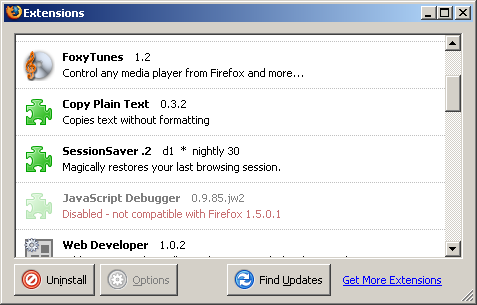
First thing you need to do is shut down firefox. Next, open the file “extensions.rdf” from your profile directory (something similar to C:\Documents and Settings\your username\Application Data\Mozilla\Firefox\Profiles\default.ugt in windows, ~/.mozilla/firefox/eucals91.default in linux) in a text editor. (it would be a good idea to save off a backup of this file, just in case). Search for every instance of 1.5 in the file. Those cases where the line says NS1:maxVersion=”1.5″ need to be changed:
Editor’s Note: This needs to be a text editor like notepad or textpad or ultraedit. If you use word or wordpad, you will break your extensions.rdf. At least two people have done this, so please, *be careful*. Also, some text editors will append .txt to the rdf file name. ensure that when it’s done, you have the right windows file extension.
  <RDF:Description RDF:about="rdf:#$0Q1PK2"
                   NS1:id="{3550f703-e582-4d05-9a08-453d09bdfdc6}"
                   NS1:minVersion="1.5"
                   NS1:maxVersion="1.5" />
You will want to alter them so that they say NS1:maxVersion=”1.5.0.*” as below:
  <RDF:Description RDF:about="rdf:#$0Q1PK2"
                   NS1:id="{3550f703-e582-4d05-9a08-453d09bdfdc6}"
                   NS1:minVersion="1.5"
                   NS1:maxVersion="1.5.0.*" />
Now, restart firefox, and go to Tools->Extensions:
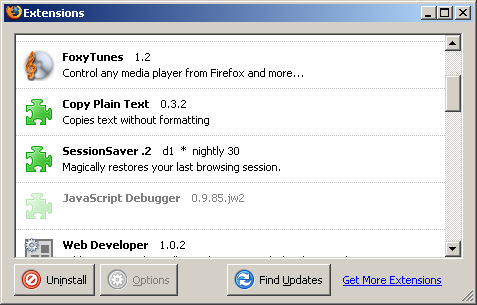
Right click on the disabled exension, and select Enable from the dropdown. Finally restart firefox. If everything went well, your extensions should be happy again.
Ed: A second solution has come to my attention in the form of the Nightly Tester Tools extension which will allow you to install incompatible extensions via it’s interface. With this installed, in the extensions panel, you can right click on an extension, and select “Make Compatible”. This method may be somewhat riskier, as it makes an extension potentially compatible across larger updates that may have API changes. The original method carries no risk of this, as it only covers security updates to firefox 1.5

