As was reported here and here back in December, Google searches now provide a lot of nice information for a band. I was checking to see if ColdPlay had a new album in the pipeline, I searched for ColdPlay and got a really nice set of results listing their albums and links for purchase, lyrics, album art, etc. Wow – I love finding new features in Google like that.
Check it out.
I just was reading the recent issue of the trendwatching newsletter. I find tracking new trends to provide very useful insights into the markets, new businesses and emerging geopolitical and economic forces.
Some of the more relevant trends as listed by TrendWatching include:
Minipreneurs – this is the trend of consumers becoming entrepreneurs, this is heavily aided by online services like eBay and Paypal.
Hygienia – this is the trend of the mature global consumer being able to instantly and expertly rate the various factors for each and every good, service and experience on offer in the marketplace. These hyper consumers trained by years of consumerism and access to up to the minute detailed information for all the products and services are the future consumer.
No-Frills-Chic – exemplified by products from Muji or Ikea, these are low cost products that have a high degree of design and quality yet are still low in price. Often coupling superior customer service to deliver an overall positive customer experience, examples of this include Jet Blue or Song.
The recent firefox 1.5.0.1 release has caused a number of problems for various parties, including extension authors and users. Sadly, many extension authors did not set up their extensions to be able to deal with firefox security updates gracefully. There have been no changes to the extension api, but a surprisingly large number of extensions report that they are Disabled – not compatible with Firefox 1.5.0.1. Well, if the extension is compatible with 1.5, you are in luck, there is a way to fix this that is not too difficult that doesn’t involve the extension author having to release a new version.
(in firefox, go to Tools->Extensions)
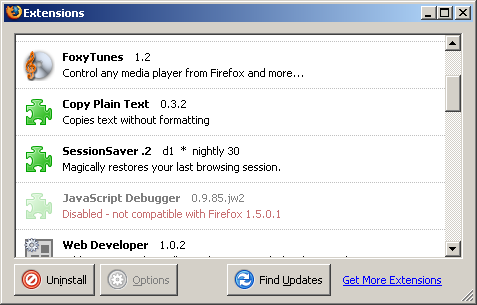
First thing you need to do is shut down firefox. Next, open the file “extensions.rdf” from your profile directory (something similar to C:\Documents and Settings\your username\Application Data\Mozilla\Firefox\Profiles\default.ugt in windows, ~/.mozilla/firefox/eucals91.default in linux) in a text editor. (it would be a good idea to save off a backup of this file, just in case). Search for every instance of 1.5 in the file. Those cases where the line says NS1:maxVersion=”1.5″ need to be changed:
Editor’s Note: This needs to be a text editor like notepad or textpad or ultraedit. If you use word or wordpad, you will break your extensions.rdf. At least two people have done this, so please, *be careful*. Also, some text editors will append .txt to the rdf file name. ensure that when it’s done, you have the right windows file extension.
  <RDF:Description RDF:about="rdf:#$0Q1PK2"
                   NS1:id="{3550f703-e582-4d05-9a08-453d09bdfdc6}"
                   NS1:minVersion="1.5"
                   NS1:maxVersion="1.5" />
You will want to alter them so that they say NS1:maxVersion=”1.5.0.*” as below:
  <RDF:Description RDF:about="rdf:#$0Q1PK2"
                   NS1:id="{3550f703-e582-4d05-9a08-453d09bdfdc6}"
                   NS1:minVersion="1.5"
                   NS1:maxVersion="1.5.0.*" />
Now, restart firefox, and go to Tools->Extensions:
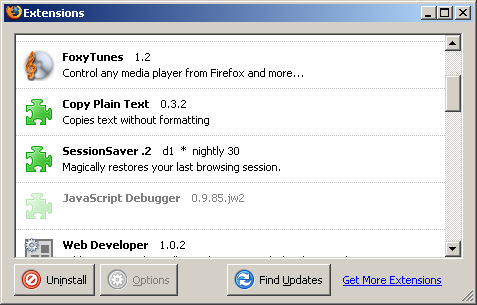
Right click on the disabled exension, and select Enable from the dropdown. Finally restart firefox. If everything went well, your extensions should be happy again.
Ed: A second solution has come to my attention in the form of the Nightly Tester Tools extension which will allow you to install incompatible extensions via it’s interface. With this installed, in the extensions panel, you can right click on an extension, and select “Make Compatible”. This method may be somewhat riskier, as it makes an extension potentially compatible across larger updates that may have API changes. The original method carries no risk of this, as it only covers security updates to firefox 1.5

